
- PRODUCTSFREEWAREFOR COMMERCIAL USEFOR PERSONAL AND BUSINESS USEBackup and System Restore:PC Privacy and Security:
- BUY ONLINE
- DISTRIBUTION
- Contents
- Index
- A -
Advanced Settings
Disable computer standby/hibernation when a long task is running

- B -
- C -
Classic: Add files and folders to a wipe list from the shortcut menu
Classic: Aggregate Trraces
Classic: Associativity Traces
Stored AutoPlay Handlers Paths
Stored COM Interface Identifiers
Stored Custom File Type Associations
Stored e-Mail Programs Information
Stored Event Logging Applications Information
Stored Info of Connection IA Apps
Stored Info of Scan Button IA Apps
Stored Media Players Information
Stored News Readers Information
Stored Perceived Types Applications
Stored Recording Software Information
Stored System Program Identifiers
Stored Web Browsers Information
Classic: Button
Classic: Caches
Classic: Cleaning Internet Activity
Classic: Cleaning Personal Traces
Classic: Cleaning Program Traces
Classic: Files Wiping Settings
Classic: Free Drive Space Settings
Classic: Installer Traces
Installer's Temporary Files and Folders
Stored Installation Information
Stored Installer Components Paths
Stored Installer Registry Keys
Stored Programs and Features Info
Stored Programs and Features Paths
Stored Programs and Features Sources
Stored Store Install Information
Stored System Installation Information
Stored UWP Programs Uninstall Time
Classic: Integration Settings
Shortcut menu of Files and Folders
Wipe files and folders directly from the shortcut menu
Wipe free space directly from the shortcut menu
Wipe Recycle Bin from the shortcut menu
Classic: Items in Internet Explorer
Classic: Items in Microsoft Edge (New)
Heavy Ad Intervention Statistics
Network Persistence Statistics
Permission Notification History
Stored Services Network Traffic
Website Redirecting Statistics
Classic: Large wipe and clean task
Classic: Logs
AAD User Device Registration Log
Application Experience Events Log
AppLocker Executable Events Log
AppX Deployment Server Events Log
AppX Deployment Service Events Log
AppX Restricted Deployment Log
BranchCache Service Events Log
Client License Service Events Log
Data Integrity Recovery Events Log
Data Integrity Scan Events Log
Date and Time Control Panel Events Log
Delivery Optimization Service Events Logs
Deployment Image Service and Management Log
Device Install Service Events Log
DHCP Client Service Events Log
Diagnostic Policy Service Events Log
Local Session Manager Events Log
Network Connection Status Indicator Events Log
Network Diagnostics Events Log
Network Location Wizard Events Log
Network Setup Service Events Logs
NLA Network Profiles Events Log
Performance Diagnostics Events Log
Provisioning Diagnostics Events Log
Resource Exhaustion Detector Log
Scheduled Diagnostics Events Log
Scripted Diagnostics Events Log
Scripted Diagnostics Provider Log
Security Mitigations Events Log
Server-initiated Healing Events Logs
Setting Synchronization Debug Log
Setting Synchronization Events Log
SMB Client Security Events Log
State Repository Service Events Log
Storage Service Diagnostics Log
Storage Settings Diagnostics Log
StorPort Dagnostics Events Log
Task Scheduler Maintenance Log
TimeZone Synchronization Task Log
User Profile Service Events Log
Volume Snapshot Driver Events Log
Windows Biometric Service Events Log
Windows Container Bind Filter Log
Windows Container Isolation Service Log
Windows Defender Monitoring Log
Windows Firewall Diagnostics Log
Windows Time Service Events Log
WLAN AutoConfig Service Events Log
Classic: Managing Existing Wipe and Clean Tasks
Classic: Miscellaneous Traces
Background Activity Moderator Data
Cached Applications Compatibility Info
Startup Menu Experience Host Traces
Store Locations of Type Libraries
System Temporary Files and Folders
Classic: Panel
Classic: Program Data Traces
Common Windows Search Cache Files
Digital Rights Management Traces
Power Efficiency Diagnostics Reports
Software Quality Monitoring Traces
Stored Startup Applications Info
Update Orchestrator Events Logs
Windows Defender Delayed Reports
Windows Defender Detection Log
Windows Defender Network Inspection Service Log
Windows Defender Quick Scan Results
Windows Health and Optimized Experiences Service Performance Tracking Summaries
Windows Search Stream Log Files
Classic: Recent Activity
Classic: Services Accounts Traces
Delivery Optimization Service Cache Files
Local Service's Cached Certification Files
Local Service's Temporary Files
Local System Cached File Extensions
Local System Cached Shell Extensions
Local System Stored Application Descriptions
Local System Stored AutoPlay Handlers Paths
Local System Stored AutoPlay Handling Events
Local System Stored Internet Explorer Shortcut Menu Extensions
Local System's Cached Certification Files
Local System's Common Language Runtime Logs
Local System's Direct3D Shader Cache
Local System's Temporary Files
Local System's Windows Search Databases
Network Service's Cached Certification Files
Network Service's Diagnostics Logs
Network Service's Temporary Files
Classic: Setup and Update Traces
Provisioning Temporary Folders
Windows Update Medic Service Events Logs
Classic: Starting Tasks from a Command Line and Shortcuts
Classic: Startup Renaming
Classic: Storing Traces
Stored addresses of unread mail
Stored Application Compatibility Settings
Stored Application Descriptions
Stored Applications Compatibility Settings
Stored Browser Plugins Information
Stored Control Panel Extensions
Stored Legacy Services Information
Stored Locations of Shared Modules
Stored Locations of System Type Libraries
Stored Notification Display Info
Stored Registry Virtualization
Stored Start Menu Tile Properties
Stored Startup Applications Info
Stored System Environment Variables
Stored System Tray Icon Settings
Stored USB Storage Information
Stored UWP Programs Window Sizes
Stored Wireless Networks Profiles
Taskbar Badges Update Statistics
Taskbar Button Click Statistics
Taskbar Program Launch Statics
Taskbar Program Switching Statistics
Classic: Tasks Settings
automatically clean/wipe such files at the next system startup
automatically save changes in the tree of the task items
If some files included into a wiping and cleaning task were locked during task execution
Manage Custom Task Starting Programs...
Classic: Traces Selection Helper
Less Important Internet Activity Traces
Less Important System's Activity Traces
Less Important User's Activity Traces
Classic: Transferring Tasks from One Computer to Another
Classic: Trees and Windows Settings
Classic: Using Scheduler
Classic: Wipe Lists
Managing files/folders in wipe lists
Managing Registry keys in wipe lists
Classic: Wiping File Alternative Data Streams
Classic: Wiping Tasks and Scheduler
Contact Information and Technical Support
- D -
- F -
File Erasure on SSD and HDD devices
- G -
- I -
Importing Task from a Command Line
Installer Files
- L -
- M -
- O -
- P -
- R -
- S -
Settings
Smart: Exporting and Importing Wipe Lists
Smart: Using INI File Format for Import
Smart: Working with Wipe Lists
Stored Profiles in Forms
- T -
Touch: Add files and folders to a wipe list from the shortcut menu
Touch: Advanced Settings
Disable computer standby/hibernation when a long task is running
Touch: Aggregate Trraces
Touch: Associativity Traces
Stored AutoPlay Handlers Paths
Stored COM Interface Identifiers
Stored Custom File Type Associations
Stored e-Mail Programs Information
Stored Event Logging Applications Information
Stored Info of Connection IA Apps
Stored Info of Scan Button IA Apps
Stored Media Players Information
Stored News Readers Information
Stored Perceived Types Applications
Stored System Program Identifiers
Stored Web Browsers Information
Touch: Button
Touch: Caches
Touch: Cleaning Internet Activity
Touch: Cleaning Personal Traces
Touch: Cleaning Program Traces
Touch: Files Wiping Settings
Touch: Free Drive Space Settings
Touch: Importing Task from a Command Line
Touch: Installer Traces
Installer's Temporary Files and Folders
Stored Installation Information
Stored Installer Components Paths
Stored Installer Registry Keys
Stored Programs and Features Info
Stored Programs and Features Paths
Stored Programs and Features Sources
Stored Store Install Information
Stored System Installation Information
Stored UWP Programs Uninstall Time
Touch: Integration Settings
Shortcut Menu of Files and Folders
Wipe files and folders directly from the shortcut menu
Wipe free space directly from the shortcut menu
Wipe Recycle Bin from the shortcut menu
Touch: Items in Internet Explorer
Touch: Items in Microsoft Edge (New)
Heavy Ad Intervention Statistics
Network Persistence Statistics
Permission Notification History
Stored Services Network Traffic
Website Redirecting Statistics
Touch: Large wipe and clean task
Touch: Logs
AAD User Device Registration Log
Application Experience Events Log
AppLocker Executable Events Log
AppX Deployment Server Events Log
AppX Deployment Service Events Log
AppX Restricted Deployment Logx
BranchCache Service Events Log
Client License Service Events Log
Data Integrity Recovery Events Log
Data Integrity Scan Events Log
Delivery Optimization Service Events Logs
Deployment Image Service and Management Log
Device Install Service Events Log
DHCP Client Service Events Log
Diagnostic Policy Service Events Log
Local Session Manager Events Log
Network Connection Status Indicator Events Log
Network Diagnostics Events Log
Network Location Wizard Events Log
Network Setup Service Events Logs
NLA Network Profiles Events Log
Performance Diagnostics Events Log
Provisioning Diagnostics Events Log
Resource Exhaustion Detector Log
Resource Exhaustion Resolver Log
Scheduled Diagnostics Events Log
Scripted Diagnostics Events Log
Scripted Diagnostics Provider Log
Security Mitigations Events Log
Server-initiated Healing Events Logs
Setting Synchronization Debug Log
Setting Synchronization Events Log
SMB Client Security Events Log
State Repository Service Events Log
Storage Service Diagnostics Log
Storage Settings Diagnostics Log
StorPort Dagnostics Events Log
Task Scheduler Maintenance Log
TimeZone Synchronization Task Log
User Profile Service Events Log
Windows Biometric Service Events Log
Windows Container Bind Filter Log
Windows Container Isolation Service Log
Windows Defender Monitoring Log
Windows Firewall Diagnostics Log
Windows Time Service Events Log
WLAN AutoConfig Service Events Log
Touch: Managing Existing Wipe and Clean Tasks
Touch: Miscellaneous Traces
Background Activity Moderator Data
Cached Applications Compatibility Info
Startup Menu Experience Host Traces
Store Locations of Type Libraries
System Temporary Files and Folders
Touch: Program Data Traces
Common Windows Search Cache Files
Digital Rights Management Traces
Power Efficiency Diagnostics Reports
Software Quality Monitoring Traces
Stored Startup Applications Info
Update Orchestrator Events Logs
Windows Defender Detection Log
Windows Defender Network Inspection Service Log
Windows Defender Quick Scan Results
Windows Health and Optimized Experiences Service Performance Tracking Summaries
Windows Search Stream Log Files
Touch: Recent Activity
Touch: Scheduler Settings
Automatically wipe locked files at the next system startup
Touch: Services Accounts Traces
Delivery Optimization Service Cache Files
Local Service's Cached Certification Files
Local Service's Temporary Files
Local Service's Windows Search Databases
Local System Cached File Extensions
Local System Cached Shell Extensions
Local System Stored Application Descriptions
Local System Stored AutoPlay Handlers Paths
Local System Stored AutoPlay Handling Events
Local System Stored Internet Explorer Shortcut Menu Extensions
Local System's Cached Certification Files
Local System's Common Language Runtime Logs
Local System's Direct3D Shader Cache
Local System's Temporary Files
Local System's Windows Search Databases
Network Service's Cached Certification Files
Network Service's Diagnostics Logs
Network Service's Temporary Files
Store Install Service Database
Touch: Setup and Update Traces
Microsoft Update Health Tools Log
Provisioning Temporary Folders
Windows Update Medic Service Events Logs
Touch: Starting Tasks from a Command Line and Shortcuts
Touch: Storing Traces
Stored addresses of unread mail
Stored Application Compatibility Settings
Stored Application Descriptions
Stored Applications Compatibility Settings
Stored Browser Plugins Information
Stored Control Panel Extensions
Stored Legacy Services Information
Stored Locations of Shared Modules
Stored Locations of System Type Libraries
Stored Notification Display Info
Stored Registry Virtualization
Stored Start Menu Tile Properties
Stored Startup Applications Info
Stored System Environment Variables
Stored System Tray Icon Settings
Stored USB Storage Information
Stored Wireless Networks Profiles
Taskbar Badges Update Statistics
Taskbar Program Switching Statistics
Touch: Using Scheduler
Do not schedule (run manually)
Schedule at Browser and/or Chat Closing
Touch: Wipe Lists
Managing files/folders in wipe lists
Managing Registry keys in wipe lists
Touch: Wiping Tasks and Scheduler
- V -
- W -
Wiping Algorithms
Home > Touch Interface: Main Panel > Wiping and Cleaning > Cleaning a Computer > Cleaning System's Own Traces
Cleaning System's Own Traces
Your may clear system traces such as registry traces, temp files, system history, caches , and various log files. You may see the contents of any particular item on its respective panel.
You may also include system's own traces cleaning into a large wipe and clean task. Go to the Setting a Large Wipe and Clean Task section for details.
The list of items visible on the System panel can be edited on the Customize panel.
To clean traces of system activity,
• Select the System's Own Traces item.
The System panel will appear.
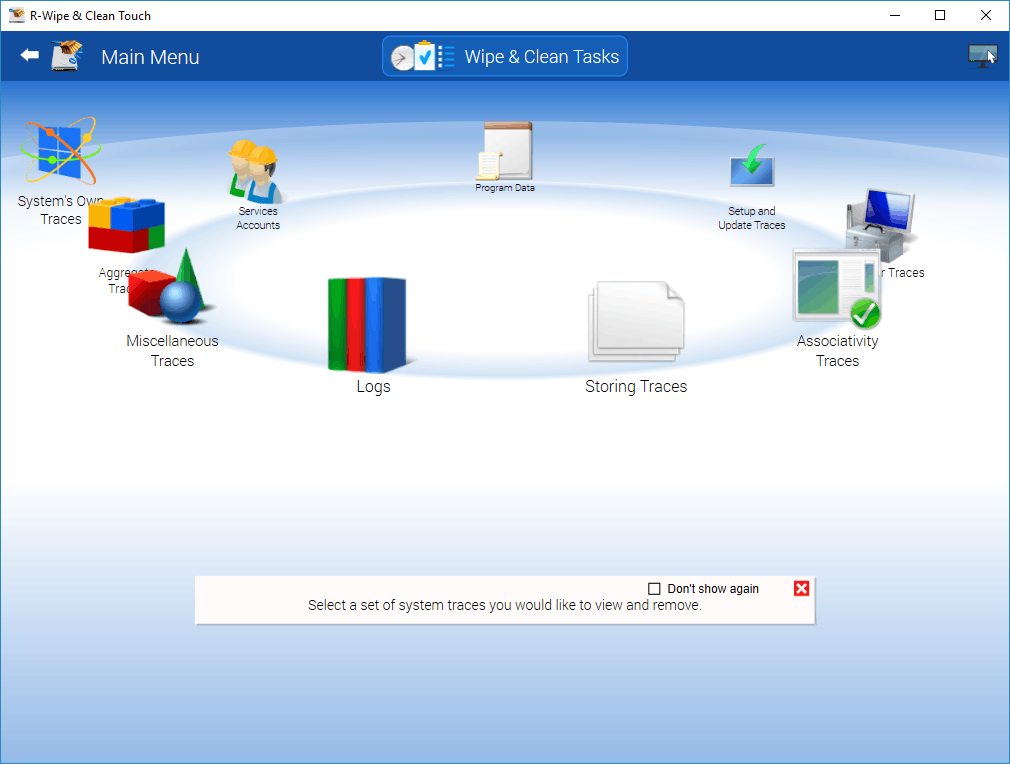
System's Own Traces
• Go to the required section(s) and select the required items.
The section may contain some critical items that may affect system performance. R-Wipe & Clean will throw a warning about these items if you select the entire section.
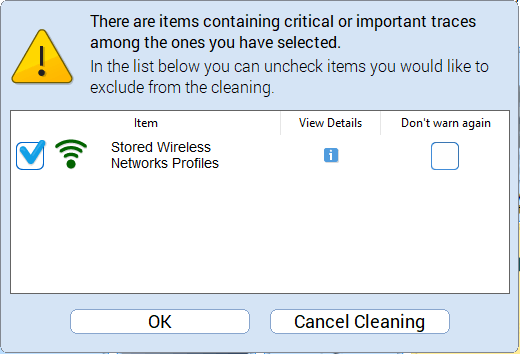
Critical Item warning
Select these items only if you completely understand what you are doing.
• Tap the Clean Now button.
R-Wipe & Clean will start cleaning the computer, and the Deleting and wiping dialog box will appear showing the cleaning progress.
System traces are divided into nine parts:
You may read more about these items in the R-Wipe & Clean Classic help.
 Logs: More Information...
|
This part allows you to inspect and clean various logs created by various system components. Quite often you may gain some free drive space upon removing these logs. |
|
|
Event logs of the BLB (Block Level Backup) Engine Service. |
|
|
Event log the Boot File Servicing Utility for Boot File Repair. |
|
|
A log file of the Windows Component-Based Servicing activity that may help in troubleshooting. |
|
|
Delivery Optimization Service Events Log created by the delivery optimization service for troubleshooting. |
|
|
Deployment Image Service and Management Log Microsoft (DISM) tools can reate a log to assist in tourbleshooting. |
|
|
Your system creates several log files that assist in troubleshootng. Double-click a file to view its. content. |
|
|
Your system creates some diagnostics and event logs for disk recovery events. |
|
|
Your system creates diagnostic log files of the Event Logging component. |
|
|
Log files from the LSA (Local Security Authority) service that validates local and remote sign-ins to enforce local security polices. Those files are used to assist in troubleshooting. |
|
|
Your system creates a log file that assist in Measured Boot troubleshootng. The Measured Boot feature that provides antimalware software with a trusted log of all boot components to determine whether the component is clear or infected with malware. |
|
|
Microsoft .Net tools and services may create logs to assist in tourbleshooting. Double-click a file to view its content. |
|
|
Network Setup Service Events Logs created by the network setup service to assist in troubleshooting of network driver installation. |
|
|
Logs of program installation used to check compatibility. |
|
|
Logs of the SAM (Security Account Manager) events. SAM is used to authenticate local and remote users. |
|
|
Server-initiated Healing Events Logs created by the Windows Update service to assist in troubleshooting. |
|
|
Services may create log files that assist in troubleshooting. |
|
|
Your system creates trace logs of the Microsoft Distributed Transaction Coordinator (DTC) service that coordinates transactions between databases, message queues, file systems, and other resources. |
|
|
Logs of Network Diagnostics Framework (NDF) that provides a way for users to diagnose and repair network problems using a single troubleshooting tool. |
|
|
The log of events created by Sleep Study tool that identifies sources of battery drain during computer's sleep time. |
|
|
A log containing a list of files that Windows renames during its startup. May help in troubleshooting. |
|
|
A log of Storage management performed using Group Policy. |
|
|
An event log of the System Restore service that can assist in troubleshooting. |
|
|
Your system can create various tracing logs that may assist in troubleshooting. |
|
|
Log of Windows Diagnostic Infrastructure (WDI) that help to detect, diagnose and solve common problems with a minimum user interactions. |
|
|
Event log of Windows Diagnostic Infrastructure (WDI) that help to detect, diagnose and solve common problems with a minimum user interactions. |
|
|
Logs of Windows Diagnostic Infrastructure (WDI) that store information about applications launched during system startup to assist in troubleshooting. |
|
|
Your system keeps a log of Windows events (System, Security, and Applications). You may edit the list of items you want to view. Right-click the header and change the list of items to show. |
|
|
Your system keeps a log of the Windows built-in firewall. You need to restart your system to start wiping this log. You will be prompted to restart your system or to delay wiping until the next restart. |
|
|
Your system keeps a log of the Windows Recovery Environment (WinRE) that can repair common causes of unbootable operating systems. |
|
|
WIP Logs (Windows 10+) |
Your system keeps a log of the Windows Information Protection (WIP) that can protect against enterprise data leakage through apps and services like email, social media, and public clouds that are outside of the enterprise control. |
|
Windows Management Instrumentation (WMI) and WMI providers create several log files that assist in troubleshooting. |
|
|
(Windows 10+) |
Your system keeps an event log of Azure Active Director (AAD) that provides common identity and access capabilities to all web services. |
|
AAD User Device Registration Log (Windows 10+) |
The Azure Active Directory (AAD) is a Microsoft cloud-based identity and access management service which helps a company's employees sign in and access both the external and internal resources of the company. |
|
An event log of actions with AppIDs. |
|
|
Application Experience Service creates an event log of software updates to programs to ensure they run on newly released Windows versions. |
|
|
An event log of Application Server, an integrated environment for deploying and running custom, sever-based business applications. |
|
|
An event log of AppLocker that allows or denies application execution. |
|
|
An event log of AppLocker that allows or denies script execution. |
|
|
The AppModel Runtime Events Log stores the events of Universal Windows Platform applications. |
|
|
The log of the App Readiness Diagnostics, the service that makes apps ready for use them the first time when the user signs in to PC or when adding a new app |
|
|
The log of the App Readiness Service that makes apps ready for use them the first time when the user signs in to PC or when adding a new app. |
|
|
The AppX Deployment Server Events Log stores the events of AppX Deployment Server during updating Store applications. |
|
|
The AppX Deployment Service Events Log stores the events of AppX Deployment Service during deploying Store applications. |
|
|
Your system can create a log of events that occurred with Microsoft Store application packages |
|
|
Your system can create a log of restricted operations events that occurred with Microsoft Store application packages |
|
|
(Windows 10+) |
The event log of the Deployment Extension Handler (DEH) allowing apps to access extensibility points in the system. An undocked DEH ships outside of an OS release. |
|
Your system can create a log of events that occurred in various audio devices in the system. |
|
|
Your system can create a log of events that occurred during user authentication via user interface (UI). |
|
|
The Audio Glitch Detection Log stores events of audio glitches made by Windows Audio Service. |
|
|
The Audio Playback Log stores a list of audio playbacks by the Windows Audio service. |
|
|
(Windows 10+) |
The Azure Setting Sync Events Log stores information about this cloud service used for managing applications and services through Microsoft-managed data centers. |
|
(Windows 10+) |
The Backup and Restore Debug Log stores debug information that can be used to assist in troubleshooting. |
|
The log of the BitLocker Drive Preparation (BDP) Tool is used to prepare the computer for BitLocker Drive Encryption. |
|
|
The event log of BitLocker, a data protection feature that encrypts system and data volumes. |
|
|
The Background Intelligent Transfer Service (BITS) creates a log of background file transfers. |
|
|
The BranchCache Service Events Log stores information about cached network content from peers on the local subnet. |
|
|
The Background Tasks Infrastructure Service (BTIS) controls the background tasks to run in the the system. |
|
|
The log of events of the Challenge Handshake Authentication Protocol (CHAP) used to authenticate the user in PPTP-based networks. |
|
|
The Log of Client License service that provides infrastructure support for Microsoft Store. |
|
|
(Windows 10+) |
The Log of Cloud Recovery that enables you to reset your computer with files downloaded from Microsoft rather than the installation files stored on your local computers. |
|
(Windows 10+) |
The Log of CloudStore component used by OpenDrive. |
|
The Log of Code Integrity, a Windows mechanism that authenticates the integrity and source of executable images (applications, DLL, drivers, etc.) by validating a digital certificate contained within the image resources. |
|
|
The System Core Application system component creates a log of Universal Windows Platform application events. |
|
|
An event log of recovering fault-tolerant volumes. |
|
|
An event log of scanning fault-tolerant volumes for latent corruptions. |
|
|
An event log of the Date and Time Control Panel. |
|
|
(Windows 10+) |
The event log of default program assignments for certain file types and protocols. |
|
The event log of the Device Install service that allows the computer to recognize hardware changes and adapt the system to them with little or no interactions with the user. |
|
|
The Device Setup Manager (DSM) service used for detection, download and installation of device-related software creates a log of events during device setup. |
|
|
(Windows 10+) |
The Watchdog service used to control device hangs creates a log of events. |
|
The DHCP Client service creates a log of events during obtaining and updating IP addresses and DNS records. |
|
|
The event log of working on IPv6 networks. |
|
|
The Diagnostic Policy Service that helps detecting, troubleshooting, and resolving problems, creates a log of events. |
|
|
(Windows 10+) |
The Disk Cleanup frees up space on computer's hard drive. It creates a log of its diagnostics. |
|
Log of the DPAPI (Data Protection Application Programming Interface) component of the system data encryption. |
|
|
The Device Setup Manager (DSM) service used for detection, download and installation of device-related software creates a log of events. |
|
|
The Extensible Authentication Protocol (EAP) Host service provides an authentication in various networks and creates a log of events. |
|
|
Log of the Fault Tolerance Heap that monitoring application crashes and makes necessary mitigation to prevent future crashes. |
|
|
The Group Policy Client service used to apply settings configured through the Group Policy component creates a log of events. |
|
|
The event log of overheated hardware components and system actions. |
|
|
The activity log of Hyper-V system that runs virtual machines. |
|
|
The event log of the Hyper-V system that runs virtual machines. |
|
|
The event log of Hyper-V Virtual Switch that provides connection for virtual machines to external networks. |
|
|
The log of kernel events during startup time. |
|
|
(Windows 11+) |
The cached data for kernel-mode functions. |
|
(Windows 11+) |
The event log for kernel dumps created when your system can't run correctly. |
|
The log of events occurred in the system or application at the kernel level. |
|
|
(Windows 10+) |
The Kernel I/O Events Log stores events of communications between applications and interfaces provided by device drivers. |
|
The Kernel Live Dump Capture Log stores events of abnormal situation when the OS can continue operation. |
|
|
The Kernel Shim Engine that provides device and driver shims creates a log of its events. A device shim is a hardware-specific "workaround". A drive shim is a custom routine for chaning the behavior of the driver. |
|
|
The log of errors occurred in "Known Folders" (Documents, Downloads, Pictures, Videos, etc.). |
|
|
Log of errors occurred during Language Pack setups. |
|
|
The log of events created by Local Session Manager managing local user sessions. |
|
|
(Windows 10+) |
The log of attempts of unauthorized access to system resources by applications running in a less privileged app container (LPAC). |
|
The log of events created during the diagnostics of Mobile Device Management (MDM) services. |
|
|
(Windows 10+) |
The log of events created during the security of Mobile Device Management (MDM) services |
|
The event log of Microsoft account. |
|
|
The event log of Multilingual User Interface (MUI) that can help in troubleshooting. |
|
|
(Windows 11+) |
The event log of NCrypt system component that is used for data encryption. |
|
The event log of the NCrypt system component that provides data encryption. |
|
|
The service log of the NCD (Network Connected Device) Auto-Setup service that monitors and installs qualified devices that connect to qualified networks. |
|
|
The event log of Network Connection Status Indicator (NCSI), a service detecting Internet connectivity status. |
|
|
The event log of network diagnostics. |
|
|
The event log of Network Location Awareness (NLA) service creating a Network Profile for every network it connects to. |
|
|
The event log of Network Location Awareness (NLA) service that stores configuration information for the network and notifies programs when this information is modified. |
|
|
The event log of Network Location Wizard Events that identifies the type of network (private or public) that PC is connected to with a network adapters. |
|
|
The NTFS disk event log. |
|
|
The event log of Activity Center that monitors the NTFS disk status. |
|
|
The event log of offline local copies of files stored on the network. |
|
|
Partition Diagnostics Events Log (Windows 10+) |
The log of events that occurred during the diagnostics of data storage devices connected to this PC. |
|
(Windows 11+) |
The event log of the PCI (Peripherial Computer Interconnect) bus for attached hardware devices. |
|
The log of diagnostic events for the PCW (Performance Counters for Windows) that collects various system data (statistics for CPU, memory, and disk usage). |
|
|
The event log of Performance Diagnostics that monitors system problems. |
|
|
The log of device configuration for the Plug and Play (PnP) service enabling a computer to recognize and automatically adapt itself to hardware changes. |
|
|
The event log of the Plug and Play (PnP) service enabling a computer to recognize and automatically adapt itself to hardware changes. |
|
|
The diagnostics log of the PowerShell framework that manages task automation and configuration.. |
|
|
The event log of the PowerShell, a task automation and configuration management framework . |
|
|
The event log of printing of various documents . |
|
|
(Windows 10+) |
The event log of the changes in the access rights of applications o various system components. |
|
The event log of the Program Compatibility Assistant that helps end users run desktop applications designed for earlier Windows versions. |
|
|
Provisioning Diagnostics Events Log (Windows 10+) |
The diagnostics event log of the Windows Provisioning that configures end-user devices |
|
The event log of the RDP (Remote Desktop Protocol) clients. |
|
|
The event log of the RDP (Remote Desktop Protocol) core. |
|
|
The event log of ReadyBoost that makes NAND memory (CompactFlash, SD cards, and USB memory sticks, etc) be used as a write cache between RAM and a hard drive to increase throughout performance. |
|
|
The event log of Windows Remote Assistance, a service that allows a trusted entity to remotely fix issues. |
|
|
The event log of Remote Connection Manager, a service that is used to establish a connection with remote PCs. |
|
|
The event log of Windows Resource Exhaustion Detector that notifiers the user of system resource exhaustion (free disk space, free RAM, etc.). |
|
|
The event log of the Resource Exhaustion Resolver that provides details about corrective actions you can take to recover system resources when the system has a critical amount of memory committed to applications. |
|
|
The event log of scheduled diagnostics the system performs. |
|
|
The event log of scripted diagnostics performing periodical system maintenance by automatic fixing problems or reporting them through Action Center. |
|
|
The history log of scripted diagnostics performing periodical system maintenance by automatic fixing problems or reporting them through Action Center. |
|
|
The event log of scripted diagnostics provider performing periodical system maintenance by automatic fixing problems or reporting them through Action Center. |
|
|
Security Mitigations Events Log (Windows 10+) |
The event log of exploit mitigation techniques used to protect your system and system processes. |
|
The debug log of Setting Synchronization service that synchronizes your system settings with your other devices. |
|
|
The event log of the Setting Synchronization service that synchronizes your system settings with your other devices. |
|
|
The event log of the Action Core Action Center events that occur in the system's shell core. |
|
|
The event log of Windows Shell Core. |
|
|
(Windows 10+) |
The event log of Shell startup. |
|
The connectivity event log of the client-side SMB events. SMB (Server Message Block) is a protocol for shared access to files and printers in a network. |
|
|
The event log of the client-side SMB events. SMB (Server Message Block) is a protocol for shared access to files and printers in a network. |
|
|
The event log of the client-side SMB security events. SMB (Server Message Block) is a protocol for shared access to files and printers in a network. |
|
|
The event log of the server-side SMB connectivity events. SMB (Server Message Block) is a protocol for shared access to files and printers in a network. |
|
|
The event log of the server-side SMB events. SMB (Server Message Block) is a protocol for shared access to files and printers in a network. |
|
|
(Windows 10+) |
The event log of the SMS Router Service that routes messages basing on rules to appropriate clients. |
|
The event log of the SPP UX component (Software Protection Platform User Experience), the system component that handles the user experience for Windows licensing. |
|
|
State Repository Service Events Log (Windows 10+) |
The event log of the State Repository Service that provides required infrastructure support for applications. |
|
(Windows 10 |
The event log of the Windows Storage Management component that is used to manage various storage configurations. |
|
The event log of the PnP operations on storage devices. |
|
|
Storage Service Diagnostics Log (Windows 10+) |
The event log of the Storage Service provides enabling services for storage settings and external storage expansion. |
|
Storage Settings Diagnostics Log (Windows 10+) |
The diagnostic log of the Storage Settings Diagnostics system. |
|
The event log of the Storage Spaces Agent system. |
|
|
(Windows 8 and later) |
The event log of the Storage Space service. |
|
(Windows 11+) |
The event log of Storage Volumes. |
|
The event log of Windows Store Client application. |
|
|
The event log of Windows Store Licensing model that allows to run any purchased application any device from one account. |
|
|
StorPort Dagnostics Events Log (Windows 10+) |
The event log of the StorPort (storage port) driver diagnostics. |
|
The event log of the StorPort (storage port) driver. |
|
|
The maintenance log of Task Scheduler. |
|
|
The event log of TimeZone Synchronization service updating time zone informaiton. |
|
|
The event log of TWinUI (Tablet Windows User Interface) launching UWP (Universal Windows Platform) applications. |
|
|
The event log of UAC (User Account Control) that can assist in troubleshooting. |
|
|
The event log of UAC (User Account Control) that visualizes files in system folders for security reasons. |
|
|
The event log of User Profile Service that loads and unloads user profiles. |
|
|
(Windows 10+) |
The event log of Universal Telemetry Client (UTC) service that collects telemetry data in Windows 10. |
|
The event log of VHDMP (Virtual Hard Disk MiniPort) service that simulates disk devices when, for example, you mount an ISO image. |
|
|
Volume Snapshot Driver Events Log (Windows 10+) |
The event log of Volume Snapshot Driver that ensures backup consistency. |
|
The event log of Windows Connection Manager (WCM) service that makes automatic connect/disconnect decisions by looking at Ethernet Wi-Fi, and mobile broadband interfaces. |
|
|
(Windows 10+) |
The event log of Web Authentication Events, a solution for hardware-bound credentials that can replace less secure the login/password authentication method. |
|
The diagnostic event log of Windows Error Reporting (WER) service that notifies Microsoft about application faults, kernel faults, unresponsive applications, and other applications. |
|
|
(Windows 11+) |
The kernel live dump event log of Windows Error Reporting (WER) service that collects data to troubleshoot abnormal situations while Windows continues its operation. |
|
(Windows 10+) |
The event log of Windows Error Reporting (WER) service that notifies Microsoft about application faults, kernel faults, unresponsive applications, and other applications. |
|
The event logs of Windows Filtering Platform (WFP), that allows Windows software to process and filter network traffic. |
|
|
The event logs of the Internet Key Exchange service of the Windows Filtering Platform (WFP), that allows Windows to exchange secret keys safely. |
|
|
The event log of Windows Hardware Error Architecture (WHEA) that provides a hardware error handling mechanism. |
|
|
(Windows 10+) |
The event log of Win32 Driver, the kernel-mode side of the Win32 Windows subsystem that is loaded when the boot process is complete and the system moves into the User mode. |
|
The event log of Windows Biometric Service that captures, compares, manipulates, and stores biometric data without access to any biometric hardware. |
|
|
Windows Container Isolation Service Log (Windows 10+) |
Containers provide a lightweight, isolated environment that makes apps easier to develop, deploy, and manage. |
|
Windows Container Bind Filter Log (Windows 10+) |
The event log for the Windows Bind Filter service that binds filesystem namespaces to different locations and hides this remapping from the user |
|
The event log of Windows Defender Service that protects the users from malware and other potentially harmful software. |
|
|
The monitoring log of Activity Center that monitors the state of Windows Defender. |
|
|
Windows Firewall Diagnostics Log (Windows 10+) |
The diagnostics log of Windows Firewall that protects the computer by preventing unauthorized access through the Internet of local network. |
|
The event log of Windows Firewall that protects the computer by preventing unauthorized access through the Internet of local network. |
|
|
(Windows 10 only) The event log of Windows Hello, the service that allows Windows 10 devices to use your face, fingerprint, or companion device to sign in. |
|
|
The log of events occurred during Windows setup or updates. |
|
|
Windows Time Service Events Log (Windows 10+) |
(Windows 10 only) The event log of Windows Time Service Events Log, the service that allows maintains date and time synchronization on all network clients and servers. |
|
The event log of Windows Update service that detects, downloads, and installs updates for Windows and other programs. |
|
|
The event log of WinINet client platform for interactive desktop applications. |
|
|
The event log of Windows Logon component that performs some operations when a user signs in. |
|
|
The event log of Windows Remote Management (WinRM) service that performs the WS-management (Web services management) protocol used for remote software and hardware management. |
|
|
The event lof of the Windows System Assessment Tool (WinSAT) that measures various performance characteristics and capabilities of the hardware. |
|
|
The event log of WLAN AutoConfig service that discovers, connects to, configures, and disconnects from, a wireless local area network (WLAN). |
|
|
The event log of Windows Management Instrumentation (WMI) service that provides a common interface and object model to access management information about operating system, devices, applications, and services. |
|
|
The event log of Windows Push Notification (WNS) service that provides sending push data ("toast" and "tile" updates) to Universal Windows Platform applications. |
|
|
The events log of Work Folders that store files on a personal computer (bring-your-own device - BYOD). |
|
|
The management log of Work Folders that store files on a personal computer (bring-your-own device - BYOD) |
|
|
The event log of the Media Transfer Protocol (MTP) used by Windows Portable Devices (WPD) to communicate with attached media and storage devices. |
|
Storing Traces: More Information...
|
This part allows you to inspect and clean various traces (mostly insignificant) left by some system applications and services, some already removed from your system. Most of these traces are stored in the Registry. |
|
|
Your system can keep various compatibility settings for already removed applications. |
|
|
Your system can keep the environment variables created by already removed applications. |
|
|
Your system can keep some information about web browser plugins already removed from your system. |
|
|
Your system stores list of modules that applications share. |
|
|
Your system stores locations of type libraries that store information about COM objects from already removed applications. |
|
|
Your system stores some information about networks your device was connected to. |
|
|
Your system stores some information about tasks scheduled by already removed applications. |
|
|
Your system stores information about services of already removed applications. |
|
|
Your system stores information about already removed legacy services. |
|
|
Your system stores information about already removed legacy services |
|
|
Your system can keep some information (like secret key) about wireless networks your computer ever has been connected to. You may select those profiles to remove their data. |
|
Associativity Traces: More Information...
|
This part allows you to inspect and clean various traces connected with associativity of file types, protocols, etc., with already removed applications. |
|
|
Your system can keep autoplay information (what Windows is to do when detects a certain media files on a removable media device) for already removed applications. |
|
|
Your system can keep the Class Identifiers of COM objects in already removed applications. |
|
|
Your system can keep the COM interface Identifiers contained in already removed applications. |
|
|
You system can store some information about already removed e-mail applications. |
|
|
Some applications can save info about various events to the Application log of your system. Also, your system can keep some information about those applications, even if they have already been removed. |
|
|
Your system can keep the file name extensions associated with already removed applications. |
|
|
Your system can keep the built-in firewall rules for already removed applications. |
|
|
Your system stores locations of image acquisition applications - programs that start when an image-capturing device like a scanner, digital photo or movie camera. |
|
|
Your system stores information of a proxy image acquisition application - a program that start when an image-capturing device like a scanner, digital photo or movie camera, if no other application is assigned to those actions. |
|
|
Your system can keep some information about Image Acquisition applications, programs to launch when you press the Scan button on a connected scanner. |
|
|
Your system can keep some information about media players that have been removed from the system. |
|
|
Your system stores MIME types registered by already removed applications. |
|
|
Your system stores some information about news readers already removed from the system. |
|
|
Your system stores names of already removed applications and perceived types associates with them. |
|
|
Your system stores program identifiers from already removed applications. |
|
|
Your system stores information about audio, screen, and video recording software already removed from the system. |
|
|
Your system stores information about web browsers already removed from your system. |
|
Installer Traces: More Information...
|
This part allows you to inspect and clean various data left by installers of already removed applications. Most of these traces are stored in the Registry. Sometimes you may significantly clean the Registry by removing these traces. |
|
|
The list of temporary files and folders created during the installation and updates of programs and system components |
|
|
Your system can store information about distribution kits of already removed applications. |
|
|
Windows Installer stores paths used during the installation of some programs or services. |
|
|
Windows Installer stores paths used during the installation of some programs or services. |
|
|
You system can store Windows Installer package files (with patches) of already removed applications. |
|
|
Windows Installer stores the Registry key names used during the installation of some programs or services. |
|
|
Your system stores information about already removed applications. |
|
|
Your system stores information about already removed legacy services. |
|
|
Your system stores information about already removed legacy services. |
|
|
Your system stores paths to folders from which applications or system components were installed. |
|
|
Your system stores information some information about installation and updates of the UWP (Universal Windows Platform) programs and games already removed from your system. |
|
Setup and Update Traces: More Information...
|
This part allows you to inspect and clean various data left by system setups and updates. |
|
|
Microsoft Update Health Tools Log (Windows 10+) |
The event log of Microsoft Update Health Tools that improves reliability of Windows Update Service. |
|
Provisioning Temporary Folders (Windows 10 |
Folders to store configurations and settings to enroll devices and apply those configurations fast. |
|
Log files created when your system has installed its components. Double tap a file to view its content. |
|
|
Your system stores log files created during installing updated (security and other critical updates that protect your computer). |
|
|
(Windows 11+) |
The WinSetupMon Old Logs filter driver monitors move or deletion of a file or a folder for data safety during feature updates. |
|
Your system stores event logs created by Windows Update Medic Service that remediates and protects Windows Update components. |
|
|
List of trace files created by the Windows Update service for error detection and diagnostics. |
|
|
WSUS (Windows Software Update Services or Windows Server Update Services) create some temporary and log files that assist in troubleshooting. |
|
|
WSUS (Windows Software Update Services or Windows Server Update Services) creates a log file that assist in troubleshooting. |
|
Program Data Traces: More Information...
|
This part allows you to inspect and clean various traces left by system services and installed application and which are common to all users of this computer. |
|
|
Windows Defender can log some details of its activity. |
|
|
Windows Defender can log some postponed reporting about detecting threats. |
|
|
Windows Defender can log a brief information about detected viruses. |
|
|
The Network Inspection Service of Windows Defender can log its activity to assist in troubleshooting. |
|
|
Windows Defender creates various logs during disk scan to assist in troubleshooting. |
|
|
Windows Defender stores some details about each disk scan. |
|
|
Windows Defender stores some details about each quick disk scan. |
|
|
Windows Defender can use the Windows software trace pre-processor to trace its operations for troubleshooting. |
|
|
Your system stores a cache of files with the detailed information about files used by Windows to perform very fast search among most frequently used files on the computer. Attention! When deleting and wiping the cache, you do not remove the files, only their cached copies. |
|
|
Your system stores detailed information about files which Windows uses to perform very fast search for most frequently used files on the computer . |
|
|
Your system stores detailed information about files which Windows uses to perform very fast search for most frequently used files on the computer . Double tap a file to view its content. |
|
|
Your system stores detailed information about files which Windows uses to perform very fast search for most frequently used files on the computer . Double tap a file to view its content. |
|
|
(Windows 10 and later) |
Your system stores the event log of Configuration Service Provider (CSP), an interface to read, set, modify, or delete configuration settings of the devices. |
|
Traces of the Digital Rights Management protecting proprietary data from illegal usage. Double-tap a log to view its content. |
|
|
History and some settings of the viewed Windows event logs. |
|
|
Data of the maps used by navigation applications. |
|
|
Energy reports that help users to improve common energy efficiency and solve battery life problems |
|
|
The activity traces for Reliability Monitor, and advanced tool that estimates hardware and software problems and other computer changes. |
|
|
The events log of RUXIM (Reusable UX (User eXperience) Interaction Manager), a component used by Windows Update that all required updates are properly scheduled and delivered. |
|
|
The activity traces for the Microsoft's Software Quality Monitoring program. |
|
|
Update Orchestrator Events Logs created by the Windows Update service to assist in troubleshooting. |
|
|
WFP Diagnostics log created by the Windows Filtering Platform that allows software to process and filter network traffic. It is used by firewalls, intrusion detection systems, antivirus programs, network monitoring tools, and parental control. |
|
|
Logs of Windows Security Service that handles unified device protection and health information. |
|
|
App Repository is used when downloading and installing applications from the Store. Red items can contain important information. They are not selected by default and can be removed only manually on this panel. |
|
|
A list of links to removed applications stored in the All Programs section of Start Menu. |
|
|
Stored information about removed applications launched during logon. Attention! When cleaning this list, you do not remove the files, only their links . |
|
|
Windows Health and Optimized Experiences Service Performance Tracking Summaries (Windows 11) |
The Windows Health and Optimized Experience (WHOE) service monitors the device for the better user experience and can generate Performance Tracking Summaries |
Services Accounts Traces: More Information...
|
This part allows you to inspect and clean various traces left by 3 predefined system accounts : Local System, Local Service, and Network Service. |
|
|
Registry records of items used by the system ()recent system applications, etc.) |
|
|
Temporary files that the "Local Service" account creates. |
|
|
Temporary files that the "Local System's" account creates. |
|
|
Temporary files that the "Network Service" account creates. |
|
|
The Direct3D Shader Caching Library of the System creates a cache of its files. |
|
|
A cache of documents used to authenticate web site certificates. Those include certificates, Certification Revocation Lists (CRL). Cleaning this cache removes cached copies, not the original files. |
|
|
A cache of documents used to authenticate web site certificates. Those include certificates, Certification Revocation Lists (CRL). Cleaning this cache removes cached copies, not the original files. |
|
|
A cache of documents used to authenticate web site certificates. Those include certificates, Certification Revocation Lists (CRL). Cleaning this cache removes cached copies, not the original files. |
|
|
Cached filename extensions of file types registered by applications, some of which may be already deleted. |
|
|
Cached shell extensions (added shortcut menu items added by installed applications) . Attention! When cleaning the cache, the extensions aren't removed, only their cached copies. |
|
|
Your system stores a cache of Windows Presentation Foundation fonts installed in the system. Attention! When deleting and wiping this cache, you do not remove the fonts, only their cached copies. |
|
|
Various logs created by the Common Language Runtime (CLR) component of the .Net Framework. You my view a log file by double-taping it. |
|
|
Memory dumps of crashed applications. |
|
|
Crush dumps of a network service. |
|
|
A file cache of the Delivery Optimization Service that performs content delivery optimization tasks. |
|
|
Logs created by various services and programs running under the "Network Service" account. You may view a log file by double-taping it. |
|
|
A file cache of Direct3D Shader. |
|
|
Various traces created during peer-to-peer network connections with other computers. |
|
|
Cached data of the Quality Windows Audio/Video Experience (qWAVE) service that provides features focused on streaming multimedia and real-time content over variable bandwidth networks. |
|
|
A list of application descriptions and their pats for applications that have started in the system at least once. |
|
|
A list of applications assigned to perform some acotions automatically upon detected media files on removable storage. Some information on them may remain even when they have been removed from the system. |
|
|
Events assigned by autoplay applications, which can be already removed. |
|
|
Local System Stored Internet Explorer Shortcut Menu Extensions |
A list of Internet Explorer shortcut menu commands installed by applications already removed from the system. |
|
Some data about installed UWP (Universal Windows Platform) programs and games. |
|
|
When scanning PRI (Package Resource Indexing) files of the UWP (Universal Windows Platform) applications, the MRT (Malware Removal Tool) can cache some information about these files. |
|
|
Databases of the web content used by system components. |
|
|
Databases created by Windows Search service to perform very fast searches |
|
|
Databases created by Windows Search service to perform very fast searches. |
|
Aggregate Traces: More Information...
|
This part allows you to inspect and clean various multiple-part traces. Any part of these traces can be removed separately. |
|
|
Registry records of items used by system (recent system applications, etc.). Empty system registry trace lists are dimmed. |
|
|
A tree of temporary files and logs created by various system services and programs. |
|
|
Catalog Database Service, Key Service, and Protected Root Service create temporary and log files for troubleshooting. |
|
|
Security Management Tools create temporary, database, and log files for troubleshooting. |
|
|
SRU (System Resource Usage) Monitoring Service tracks the use of hardware (CPU, memory, disk, and network) and software (file handlers and modules) resources. |
|
|
Logs and Reports of Windows System Assessment Tool (WinSAT) that measures various performance characteristics and capabilities of hardware it's running on and reports them as a Windows Experience Index (WEI) score . |
|
Miscellaneous Traces: More Information...
|
This part allows you to inspect and clean various miscellaneous traces. |
|
|
List of temporary files and folders created by your system. |
|
|
Your system stores a cache of fonts installed in the system. Attention! When deleting and wiping this cache, you do not remove the fonts, only their cached copies. |
|
|
(Windows 10+) |
Log of the Code Integrity Aggregation, a system that validates the integrity of drivers and system files every times they are loaded into the system's memory. |
|
Kernel Live Dump gathers data to troubleshoot an abnormal situation but allows Windows to continue operation. |
|
|
List of programs and services that caused problems to Windows. |
|
|
List of programs that may have memory leaks created by the Memory Leak Diagnoser component of Windows Resource Exhaustion Detection and Resolution (RADAR). |
|
|
History of Registry transactions performed by your system and applications. |
|
|
Your system can create a cache of some information about compatibility of applications that run on your system, including those already removed from the system. |
|
|
Areas of hard disks that Windows uses as it were physical memory. Data from any running program or system process may be written to these files. To start wiping swap files, you must restart your system. You will be prompted either to restart your system to start wiping the swap files, or to delay wiping until the next restart. |
|
|
Your system stores this list of files and folders in order to enhance the defragmentation process. Attention! When deleting and wiping the list, you do not remove the files, only the list. |
|
|
Your system creates these files in order to minimize system and application startup and stores them in a cache. If you delete a prefetch file for an application, the system will create it again next time the system starts the application. |
|
|
Background Activity Moderator Data (Windows 10+) |
Your system keeps track of Background Activity Moderator, a Windows service that controls activity of background applications. |
Home > Touch Interface: Main Panel > Wiping and Cleaning > Cleaning a Computer > Cleaning System's Own Traces
- R-Studio Technician: activation using a USB stick
- Data Recovery Guide
- Why R-Studio?
- R-Studio for Forensic and Data Recovery Business
- R-STUDIO Review on TopTenReviews
- File Recovery Specifics for SSD devices
- How to recover data from NVMe devices
- Predicting Success of Common Data Recovery Cases
- Recovery of Overwritten Data
- Emergency File Recovery Using R-Studio Emergency
- RAID Recovery Presentation
- R-Studio: Data recovery from a non-functional computer
- File Recovery from a Computer that Won't Boot
- Clone Disks Before File Recovery
- HD Video Recovery from SD cards
- File Recovery from an Unbootable Mac Computer
- The best way to recover files from a Mac system disk
- Data Recovery from an Encrypted Linux Disk after a System Crash
- Data Recovery from Apple Disk Images (.DMG files)
- File Recovery after Re-installing Windows
- R-Studio: Data Recovery over Network
- How To Use R-Studio Corporate Package
- Data Recovery from a Re-Formatted NTFS Disk
- Data Recovery from an ReFS disk
- Data Recovery from a Re-Formatted exFAT/FAT Disk
- Data Recovery from an Erased HFS Disk
- Data Recovery from an Erased APFS Disk
- Data Recovery from a Re-Formatted Ext2/3/4FS Disk
- Data Recovery from an XFS Disk
- Data Recovery from a Simple NAS
- How to connect virtual RAID and LVM/LDM volumes to the operating system
- Specifics of File Recovery After a Quick Format
- Data Recovery After Partition Manager Crash
- File Recovery vs. File Repair
- Data Recovery from Virtual Machines
- How to Recover Files from a Remote Computer Using R-Studio Standalone License and Its Network Capabilities in Demo Mode
- How to Connect Disks to a Computer
- Emergency Data Recovery over Network
- Data Recovery over the Internet
- Creating a Custom Known File Type for R-Studio
- Finding RAID parameters
- Recovering Partitions on a Damaged Disk
- NAT and Firewall Traversal for Remote Data Recovery
- Data Recovery from an External Disk with a Damaged File System
- File Recovery Basics
- Default Parameters of Software Stripe Sets (RAID 0) in Mac OS X
- Data Recovery from Virtual Hard Disk (VHD/VHDX) Files
- Data Recovery from Various File Container Formats and Encrypted Disks
- Automatic RAID Parameter Detection
- IntelligentScan Data Recovery Technology
- Multi-pass imaging in R-Studio
- Runtime Imaging in R-Studio
- Linear Imaging vs Runtime Imaging vs Multi-Pass Imaging
- USB Stabilizer Tech for unstable USB devices
- Joint work of R-Studio and PC-3000 UDMA hardware
- Joint work of R-Studio and HDDSuperClone
- R-Studio T80+ - A Professional Data Recovery and Forensic Solution for Small Business and Individuals Just for 1 USD/day
- Backup Articles
- R-Drive Image Standalone and Corporate license transferring
- Fixing Windows update error 0x80070643 with R-Drive Image
- Backup with Confidence
- R-Drive Image as a free powerful partition manager
- Computer Recovery and System Restore
- Disk Cloning and Mass System Deployment
- Accessing Individual Files or Folders on a Backed Up Disk Image
- R-Drive Image startup / bootable version
- File Backup for Personal Computers and Laptops of Home and Self-Employed Users
- Creating a Data Consistent, Space Efficient Data Backup Plan for a Small Business Server
- How to Move the Already Installed Windows from an Old HDD to a New SSD Device and Create a Hybrid Data Storage System
- How to Move an Installed Windows to a Larger Disk
- How to Move a BitLocker-Encrypted System Disk to a New Storage Device
- How to backup and restore disks on Linux and Mac computers using R-Drive Image
- R-Drive Image and Virtual Machines
- Undelete Articles
- Get Deleted Files Back
- Free Recovery from SD and Memory cards
- R-Undelete: Video Recovery
- Recovery from an External Device with a Damaged File System
- File recovery from a non-functional computer
- Free File Recovery from an Android Phone Memory Card
- Free Photo and Video File Recovery Tutorial
- Easy file recovery in three steps